Welcome to Fix PC for Free. You can fix most of the Computer related problems on your own.

Is your PC running very slow?

There are many reasons for a slow PC. You can make your PC faster again on your own. You do not need to pay anyone. You can do it by yourself. Just need to know what to do and how to do it. You will find it on this website.

Is your PC infected with virus?

Is your computer acting weird, getting pop ups, Errors, booting very slow and websites getting redirected to a different pages. Then your computer is infected with virus. Don't worry, you can remove the virus from your computer and get your computer back to normal. All the thing you need to do is, just follow the instructions given in this website carefully.

Internet and Browsers are having trouble?

Some times your Internet connection or Internet Browsers (i.e Internet Explorer, Firefox and Google Chrome) might not work or having trouble in connecting to the Internet. You will also see some errors on browsers while trying to connect to the Internet and open websites. You can fix them by performing some simple troubleshooting steps and runnig free tools...

Errors with Programs and Applications?

Programs and applications errors will occur, if a program is not installed properly or the installed files of that program got currupt or some times updating the program/application might also cause the errors. Troubleshooting the progrmas and applications will depends on the errors and codes. You will find some troubleshooting steps and tools in this website ...

Showing posts with label Internet and browsers problems.. Show all posts

Monday, 26 May 2014

How to change default browser to Internet Explorer

Some times you might face issues with browsing websites on the browser that you are using or you cannot view some websites on other browsers, except Internet Explorer. If you want to set Internet Explorer as the default browser, please follow the simple steps.

1. Open Internet Explorer >> Click on Tools >> Click on Internet Options

2. Click on "Programs" tab on the Internet properties window >> Click on "Make default" button

3. Click on "OK"

4. That's it, Internet Explorer is now your default browser. You can also do it in another simple way.

5. Press the Windows key + R at once

6. Type "inetcpl.cpl" (without the quotes) in the run box >> Press "Enter" key

7. Click on "Programs" tab on the Internet properties window >> Click on "Make default" button

8. Click on "OK". That should do it.


Sunday, 30 March 2014

How to perform System Restore on your PC..

You can fix many application problems or virus issues and also many computer problems,  by restoring your PC to an earlier date. Your data will not be affected. Only the applications and Windows Operating System files will be restored to the date you mentioned.

To perform a System Restore:

1. Click on Start >> Click on Accessories >> Click on System Tools >> Click on System Restore

OR

Press Windows key + R key at a time >> Type "rstrui.exe" without the quotes >> Press Enter key

2. Click on "Next" >> Select a date to which you want to restore the PC. 
(You can select the box "Show more restore points" to get more restore points in Vista and Windows 7)


3. Click "Finish"  >> Click on "Yes".


Tuesday, 11 March 2014

How to perform a "Clean boot" on your PC.

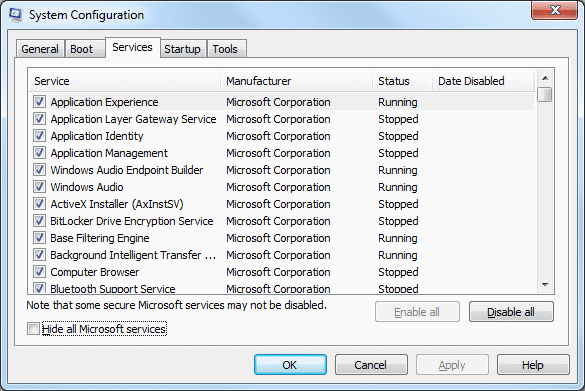
Follow the below steps to perform a "Clean Boot" on your PC.

1. For Windows Xp ---> Click on Start >> Click on Run >> Type "msconfig" without the quotes in the Run box >> Press Enter key

2. For Windows Vista,7 and 8 --> Click on Start >> Type "msconfig" without the quotes in the Search bar >> Press Enter key

3. Go to "Services" tab

4. Select the option "Hide All Microsoft Services".


5. Now, uncheck all the boxes in the Services tab.

6. Then go to "Startup" tab


7. Click on "Disable All" button

8. Restart the PC.